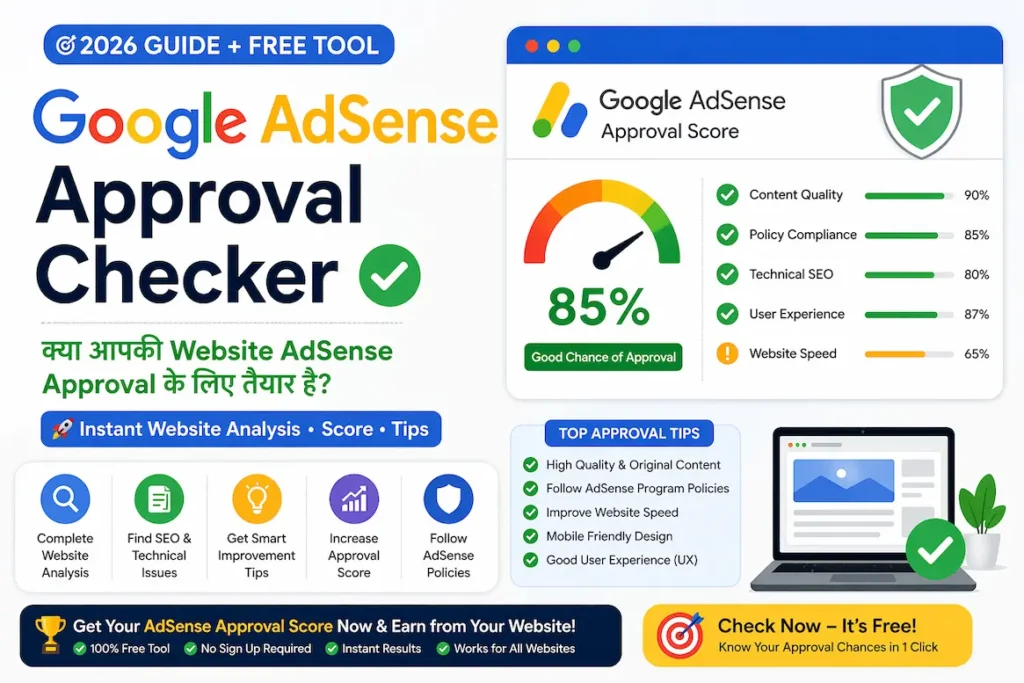
अगर आप अपनी website या blog को Google AdSense से monetize करना चाहते हैं, तो application भेजने से पहले website का एक proper self-audit करना जरूरी है। Google के अनुसार AdSense के लिए website पर unique और valuable content, अच्छा user experience, आसान navigation और applicable publisher policies का पालन होना चाहिए।
इसलिए AdSense में apply करने से पहले आपको यह देखना होगा कि आपकी website visitors के लिए वास्तव में useful है और content original और important pages आसानी से मिल रहे है और website technical रूप से सुगम भी हो।
Important: यह Google का official AdSense approval checker या approval score नहीं है। यह Google की published guidelines के आधार पर बनाया गया एक practical self-audit checklist है। किसी भी third-party checker से AdSense approval की कोई guarantee नहीं मिलती।
Google AdSense Approval Checker क्या है?
Google AdSense Approval Checker एक ऐसी checklist या self-audit process है जिसकी मदद से आप application भेजने से पहले अपनी website की मुख्य समस्याओं को पहचान सकते हैं। जिससे एड्सेंसे अप्रूवल मिलने की सम्भावना बढ़ जाती है।
इसमें आप मुख्य रूप से इन चीजों को check कर सकते हैं:
| क्या check करें? | क्या देखना है? |
|---|---|
| Original & Useful Content | Website पर original और useful content होना चाहिए |
| Content Quality & Value | Pages में पर्याप्त information और वास्तविक value भी होनी चाहिए |
| Similar/Duplicate Content | Website पर similar या duplicate content नहीं होना चाहिए |
| Navigation & Menu | Navigation और menu सही तरीके से काम कर रहे हो |
| Mobile-Friendliness | Mobile और अलग-अलग screen sizes पर website सही दिखाई देनी चाहिए |
| Important Pages | About us, Contact, Privacy Policy,Disclaimer जैसे important pages उपलब्ध होने चाहिए |
| Google Crawling | क्या Google crawler आपकी website के important pages तक आसानी से पहुंच पा रहा है |
| Broken/Misleading Links | Website पर broken, गलत या misleading links तो नहीं हैं |
| AdSense Compliance | Website Google AdSense की policies और quality guidelines का समर्थन करती है या नहीं |
Google AdSense Approval के लिए कितने Articles जरूरी हैं?
यह AdSense applicants के सबसे common सवालों में से एक है।
Google की published AdSense guidance में किसी website के लिए कोई universal fixed number of articles या fixed word count को approval requirement के रूप में नहीं बताया गया है।
इसलिए:
 “20 articles होने चाहिए”
“30 articles होने चाहिए”
“हर article कम से कम 1500 words का होना चाहिए”
Google AdSense के लिए articles की कोई तय संख्या या word limit official requirement के रूप में निर्धारित नहीं की गई है। AdSense के लिए सबसे महत्वपूर्ण है कि website पर unique, original और useful content हो, जो users को value प्रदान करे।
असल सवाल यह होना चाहिए:
क्या आपकी website पर visitor के लिए पर्याप्त, original और useful information उपलब्ध है?
उदाहरण के लिए 500 शब्दों का कोई भी article अच्छा होता है यदि उस आर्टिकल में पूर्ण value दी हो जबकि दूसरी तरफ 2000 शब्दों का article भी बेकार हो सकता है अगर उसमें केवल सामान्य बातें, repetition और filler content की बाते हो।
इसलिए केवल word count बढ़ाने के बजाय content की usefulness, originality, completeness और relevance पर ध्यान दें।
AdSense Approval से पहले Complete Website Checklist
अब अपनी website को नीचे दिए गए points के अनुसार check करें।
सबसे पहले अपने articles को पढ़ें और खुद से पूछें:
- क्या यह content original है?
- क्या इसमें user को वास्तविक और उपयोगी information मिलती है?
- Article दूसरी किसी website से कॉपी करके rewrite तो नहीं किया
- क्या इसमें practical examples हैं?
- क्या information current और accurate है?
- क्या article search intent को पूरा करता है?
Note:- Google Adsense Approvel के लिए ऐसी websites से बचने की सलाह देता है जिनका content दूसरी websites से copy या मामूली बदलाव से तैयार किया गया हो।
अगर आपने किसी external source से information ली है, तो उसे केवल दोबारा लिखने के बजाय अपनी explanation, examples, experience या additional value जोड़ें।
एक आसान test
अपने article को पढ़कर पूछें:
“कोई use article पढ़ने के बाद दूसरी website पर जाने के बजाय अपनी समस्या का समाधान पा सकता है, तो क्या मैंने पर्याप्त value दी है?”
अगर answer “नहीं” है, तो article को improve करने की जरूरत है।
Thin Content को पहचानें
Thin content का मतलब केवल कम words वाला article नहीं है।
कई बार छोटा article useful होता है, जबकि बहुत लंबा article भी low-value content हो सकता है।
अपने pages पर यह check करें:
- क्या कोई important information missing तो नहीं है?
- क्या introduction बहुत लंबा और actual answer छोटा है?
- क्या कोई ऐसा topic तो नहीं है जो एक ही बात को बार बार दोहरा रहा हो?
- क्या article में केवल basic definitions ही है?
- क्या reader को practical questions का जवाब मिल रहा है?
- क्या पूरा article किसी दूसरे source की सामान्य जानकारी जैसा दिखाई देता है?
अगर कोई page बहुत कम value दे रहा है, तो तीन options रखें:
Improve → Merge → Remove/Noindex
अगर topic useful है, तो उसे expand करें। अगर दो articles लगभग एक ही intent को target करते हैं, तो उन्हें consolidate करना बेहतर हो सकता है।
Similar Content को कैसे पहचानें और सुधारें?
अगर आपकी website पर एक ही विषय पर similar articles हैं, तो उन्हें review करें।
उदाहरण:
- AI से Content कैसे बनाएं
- AI Content कैसे बनाएं
- AI Article कैसे लिखें
- AI Content Writing Guide
अगर इन pages में काफी information एक जैसी है, तो केवल keywords बदलकर अलग-अलग pages रखना जरूरी नहीं है।
आप:
- एक मजबूत main article रखें
- दूसरे articles से useful information consolidate करें
- जरूरत होने पर redirects/canonicalization का इस्तेमाल करें
- overlapping sections हटाएँ
Canonicalization:- जब एक ही या बहुत मिलते-जुलते content के कई URLs हों, तो Google को बताना कि इनमें से कौन-सा URL मुख्य (preferred/canonical) है।
Canonical Tag Kya Hai? Duplicate Content Fix (2026)
Google भी बहुत similar pages होने पर उन्हें बेहतर बनाने या consolidate करने की सलाह देता है।
AI से बनाया गया Content Check करें
आज बहुत से bloggers research, outlining, drafting और editing के लिए AI tools का इस्तेमाल करते हैं। लेकिन AI से content बनाते समय सबसे जरूरी है human review और added value।
सिर्फ AI-generated text को बिना fact-check किए publish करने के बजाय यह workflow अपनाएँ:
AI Draft → Research → Fact-Check → Human Touch → Original Examples → Final Review → Publish
अपने article में जहाँ तक हो सके:
- अपना explanation दें
- practical steps जोड़ें
- वास्तविक examples दें
- screenshots या relevant visuals का इस्तेमाल करें
- outdated information update करें
- गलत या unsupported claims हटाएँ
खासकर SEO, earning, finance, technology और Google-related topics में facts को publish करने से पहले verify करना जरूरी है।
About और Author Information Check करें
एक professional website पर visitor को यह समझ आना चाहिए कि website किस बारे में है और content कौन तैयार करता है।
आपकी website पर एक clear About page होना उपयोगी है।
इसमें आप बता सकते हैं:
- Blog किस purpose से बनाया गया है
- किन topics पर content publish होता है
- readers को किस तरह की जानकारी मिलेगी
- content को किस approach से तैयार किया जाता है
जहाँ relevant हो, author information भी दें।
लेकिन किसी page पर केवल approval पाने के लिए artificial expertise या qualification claims न जोड़ें। जो जानकारी वास्तविक और relevant है, वही लिखें।
Important Website Pages Check करें
AdSense application से पहले अपनी website के important pages जरूर review करें।
उदाहरण:
- About us
- Contact us
- Privacy Policy
- Disclaimer
- Terms and Conditions
इन pages को केवल “AdSense approval की mandatory list” की तरह प्रस्तुत न करें। इनका मुख्य उद्देश्य website को transparent और user-friendly बनाना होना चाहिए।
विशेष रूप से यह सुनिश्चित करें कि:
- pages खुल रहे हैं
- menu से आसानी से मिल रहे हैं
- content readable है
- placeholder text नहीं है
- गलत या खाली sections नहीं हैं
Google के अनुसार अच्छा user experience और navigation महत्वपूर्ण हैं।
अपने desktop और mobile दोनों पर check करें:
Main Menu
☐ सभी important categories दिखाई देती हैं
☐ Links सही pages पर जाते हैं
☐ Dropdown सही काम करता है
☐ Parent/child categories logically arranged हैं
☐ कोई duplicate menu item नहीं है
☐ Related articles के links मौजूद हैं
☐ Anchor text meaningful है
☐ Links relevant pages पर जाते हैं
☐ 404 या missing pages नहीं हैं
Visitor को यह समझने में आसानी होनी चाहिए कि आपकी website पर information कहाँ मिलेगी।
Mobile User Experience Check करें
आज बहुत से visitors mobile devices से websites देखते हैं। इसलिए AdSense application से पहले mobile version जरूर test करें।
Check करें:
- Text आसानी से पढ़ा जा रहा है?
- Font बहुत छोटा तो नहीं?
- Menu ठीक खुलता है?
- Buttons आसानी से tap हो रहे हैं?
- Images screen से बाहर तो नहीं जा रही हैं?
- Horizontal scrolling तो नहीं हो रही?
- Header content को unnecessarily cover तो नहीं कर रहा?
- Popups user experience को खराब तो नहीं कर रहे?
सिर्फ desktop पर website अच्छी दिखना पर्याप्त नहीं है।
HTTPS और Technical Accessibility Check करें
अपनी website को technical level पर भी check करें।
Basic checklist
☐ HTTPS active है
☐ HTTP से HTTPS redirect सही है
☐ Preferred domain consistent है
☐ XML sitemap उपलब्ध है
☐ robots.txt accidental blocking नहीं कर रहा
☐ Important pages crawlable हैं
☐ Canonical tags सही हैं
☐ Broken links नहीं हैं
☐ 404 pages properly handled हैं
विशेष रूप से यह check करें कि robots.txt या किसी दूसरे technical setting से Google crawler को important content तक पहुंचने से रोका तो नहीं गया है।
Google Search Console में Website Check करें
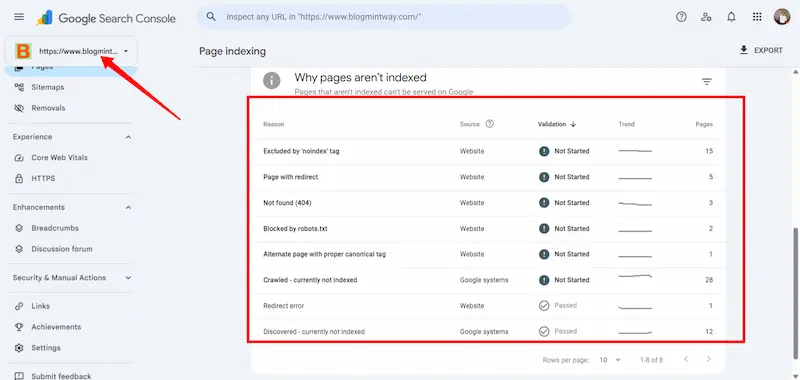
AdSense apply करने से पहले Google Search Console भी देखना उपयोगी है।
Search Console → Pages section में देखें:
- Indexed pages
- Crawled – currently not indexed
- Discovered – currently not indexed
- Error pages
यह समझना जरूरी है कि “Crawled – currently not indexed” का मतलब automatically AdSense rejection नहीं है।
लेकिन अगर आपकी website के बहुत से important pages लगातार index नहीं हो रहे हैं, तो content quality, duplication, internal linking और technical accessibility को review करना समझदारी है।
Broken और Misleading Links Check करें
हर important link को test करें।
इन समस्याओं से बचें:
❌ Missing pages
❌ Irrelevant destination
❌ Misleading titles
❌ Fake download buttons
❌ “Download” लिखकर actual download न देना
उदाहरण के लिए अगर article का title है:
“WordPress Website Speed कैसे बढ़ाएं?”
लेकिन article में दिया गया मुख्य button किसी unrelated earning page पर ले जाता है, तो user experience खराब होगा।
Link वही promise करे जो destination page पर वास्तव में उपलब्ध है।
Copyright और Scraped Content Check करें
अपनी website के content और media को review करें।
पूछें:
- क्या article किसी दूसरे website से copy किया गया है?
- क्या images का इस्तेमाल legally permitted है?
- क्या किसी दूसरे article को automatic तरीके से rewrite किया गया है?
- क्या केवल embedded videos/images के सहारे page बनाया गया है?
- क्या external content के ऊपर आपकी substantial explanation है?
दूसरी website की information का reference लेना अलग बात है और पूरी information को मामूली बदलाव के साथ republish करना अलग।
अपने content में वास्तविक added value रखें।
क्या AdSense Approval के लिए Traffic जरूरी है?
AdSense approval के बारे में कई websites अलग-अलग traffic numbers बताती हैं।
जैसे:
“100 visitors/day जरूरी हैं।”
“10,000 monthly visitors के बिना approval नहीं मिलेगा।”
ऐसे fixed numbers को universal Google requirement की तरह नहीं बताना चाहिए।
Traffic website के growth और business के लिए महत्वपूर्ण हो सकता है, लेकिन AdSense readiness को केवल traffic number से judge करना सही approach नहीं है।
इसलिए application से पहले focus करें:
Useful Content + Good UX + Technical Accessibility + Policy Compliance
क्या Domain Age जरूरी है?
इसी तरह domain age को लेकर भी बहुत से अलग-अलग claims मिलते हैं।
जैसे:
“Domain कम से कम 6 महीने पुराना होना चाहिए।”
इसे universal AdSense requirement के रूप में प्रस्तुत न करें।
अगर website नई है तो ज्यादा महत्वपूर्ण यह है कि उस पर genuinely useful content उपलब्ध हो, site accessible हो और applicable policies follow की जा रही हों।
PageSpeed Score कितना होना चाहिए?
Website speed महत्वपूर्ण है क्योंकि slow website user experience को खराब कर सकती है।
लेकिन:
PageSpeed 90 = Approval
या
PageSpeed 50 = Rejection
जैसा कोई simple formula नहीं बनाना चाहिए।
इसलिए speed को user experience के perspective से देखें:
- Page जल्दी load हो
- Images optimized हों
- unnecessary scripts कम हों
- mobile experience अच्छा हो
- layout stable रहे
Performance improve करना अच्छा है, लेकिन AdSense Approvel के लिए unrealistic target के पीछे भागना जरूरी नहीं है।
AdSense Policies को Review करें
Application भेजने से पहले Google की current AdSense/Publisher policies जरूर पढ़ें।
विशेष रूप से check करें:
☐ Copyright issues नहीं हैं
☐ Misleading content नहीं है
☐ Prohibited content नहीं है
☐ Fake claims नहीं हैं
☐ Users को ads पर click करने के लिए encourage नहीं किया गया
☐ Invalid traffic generate नहीं किया जा रहा
☐ Ads को misleading तरीके से content जैसा नहीं दिखाया जा रहा
अगर website पर पहले से ads लगे हैं, तो उनकी placement भी review करें।
AdSense के लिए क्या नहीं करना चाहिए?
Approval पाने की जल्दी में कुछ गलत shortcuts लेने से बचें।
❌ Mass AI content publish न करें
केवल articles की संख्या बढ़ाने के लिए दर्जनों low-value pages publish करना useful strategy नहीं है।
❌ दूसरे blogs को rewrite न करें
सिर्फ words या synonyms बदलने से content genuinely original नहीं बन जाता।
❌ Fake traffic न खरीदें
Traffic quality और user intent महत्वपूर्ण हैं। Artificial traffic future monetization के लिए समस्या पैदा कर सकता है।
❌ Ads पर खुद click न करें
अगर future में AdSense active हो जाता है, तो अपने ads पर click करना या दूसरों से click करवाना गंभीर policy issue बन सकता है।
❌ Fake income claims न करें
“₹5,000 रोज guaranteed” या “100% earning” जैसे claims से बचें, खासकर जब उनके पीछे reliable evidence नहीं है।
अपना AdSense Pre-Review Score कैसे बनाएं?
आप एक simple self-audit score बना सकते हैं।
ध्यान रखें: यह Google AdSense का official score नहीं है।
उदाहरण:
| Check | Status |
|---|---|
| Original Content | ✅ |
| Thin Content | ⚠️ |
| Duplicate Content | ✅ |
| Navigation | ✅ |
| Mobile UX | ✅ |
| HTTPS | ✅ |
| Important Pages | ✅ |
| Broken Links | ⚠️ |
| Technical SEO | ✅ |
| Policy Review | ✅ |
अब ⚠️ वाले sections को application से पहले improve करें।
Problems को Priority के अनुसार Fix करें
सभी समस्याएँ एक जैसी महत्वपूर्ण नहीं होतीं।
High Priority
- Copyright/duplicate content
- Serious policy concerns
- Inaccessible website
- Major navigation problems
- Large number of low-value pages
Medium Priority
- Thin articles
- Similar pages
- Broken links
- Poor mobile UX
- Outdated information
Normal Improvement
- Better formatting
- Image optimization
- Internal linking
- Metadata improvement
- Readability improvements
पहले High Priority problems solve करें।
AdSense में Review के लिए Site कब Submit करें?
जब अपनी website का complete self-audit कर लिया गया हो और major problems fix कर दी हों, तब AdSense account के Sites section से website review के लिए submit की जा सकती है।
Review का समय अलग-अलग हो सकता है। Google के अनुसार कई reviews कुछ दिनों में पूरे हो सकते हैं, जबकि कुछ cases में अधिक समय लग सकता है।
इसलिए review submit करने के बाद तुरंत result न आने पर बार-बार changes करने या application repeatedly submit करने के बजाय पहले website को stable रखें।
AdSense Approval से पहले Final Checklist
Application भेजने से पहले इस checklist को एक बार जरूर देखें:
Content
☐ Content original है
☐ Articles useful हैं
☐ Thin pages review किए हैं
☐ Similar articles consolidate किए हैं
☐ Outdated information update की है
☐ Unsupported claims हटाए हैं
Website
☐ About page
☐ Contact page
☐ Privacy Policy
☐ Relevant legal/disclaimer pages
☐ Clear navigation
☐ Working categories
☐ Working internal links
Technical
☐ HTTPS
☐ Sitemap
☐ Robots.txt
☐ Important pages crawlable
☐ Canonical URLs
☐ Broken links check
☐ Mobile usability
Policy
☐ Copyright check
☐ Misleading content check
☐ Prohibited content check
☐ Fake claims check
☐ Invalid traffic नहीं
☐ Ad-click encouragement नहीं
निष्कर्ष
Google AdSense approval पाने के लिए किसी secret formula, fixed article count या guaranteed traffic number पर निर्भर ना करें।
एक बेहतर approach है:
Original Content → Real User Value → Good Navigation → Mobile-Friendly Experience → Technical Accessibility → Policy Compliance
अपनी website को इसी checklist के अनुसार review करें। जिन pages में thin content, duplication, outdated information या unsupported claims मिलें, उन्हें improve करें। Similar pages को जरूरत के अनुसार consolidate करें और major technical या policy issues को पहले fix करें।
याद रखें, AdSense approval checker का उद्देश्य approval की guarantee देना नहीं, बल्कि application से पहले आपकी website को बेहतर और अधिक trustworthy बनाने में मदद करना है।
अगर आपकी website visitor के लिए genuinely useful है और आप उसे clear, accessible तथा policy-compliant तरीके से प्रस्तुत करते हैं, तो यही long-term strategy आपके blog के लिए ज्यादा मजबूत आधार बनाती है।
Author Profile

- I am Dharm Singh, and I share tips on blogging, SEO, and earning money online in Hindi.My goal is to help new bloggers and digital marketers learn easily and improve the ranking of their blog or website.
Latest entries
 AI & ChatGPTSeptember 9, 2026AI Content Kaise Banaye? SEO-Friendly Content Ki Complete Guide 2026
- Web HostingMay 30, 2026Hostinger vs GoDaddy 2026: India Ke Liye Best Hosting Kaun Si Hai?
- Make MoneyMay 20, 2026Online Paise Kaise Kamaye Phone Se: 2026 का सबसे प्रैक्टिकल और Deep गाइड
- BloggingMay 9, 2026How to Find Long Tail Keywords (Free Low Competition SEO Guide 2026)


This article very helpful for me and everyone. Please also check this adsense approval checker tool https://adsensechecker.net
AdSense application भेजने से पहले site का खुद audit कर लेना सही सलाह है — खासकर content की uniqueness और privacy, about, contact जैसे pages वाला हिस्सा। मैंने भी पिछले महीने अपने छोटे blog पर पड़े दो-तीन thin posts हटाए और navigation ठीक किया, तभी form भरा।
उसी हफ्ते स्कूल admission form के साथ ID की दोनों तरफ़ की copy एक ही A4 पर चाहिए थी। फ़ोन से दोनों sides की photo खींची और LensUp में एक शीट पर दोनों तरफ़ रखकर print निकाल लिया — मेरे लिए यह बस एक PDF scanner online free जैसा छोटा काम था, कोई app डाउनलोड नहीं करना पड़ा। Files upload नहीं होतीं, processing browser tab में ही होती है। छोटी बात: size वाली setting जिस limit पर रखो, output उसके आसपास ही रहता है, कभी थोड़ा ऊपर भी जा सकता है।