क्या आपने अभी-अभी WordPress पर एक नई post publish की है, लेकिन वह Google search console results में घंटों या दिनों तक दिखाई नहीं दे रही? अगर हाँ, तो आप अकेले नहीं हैं। खासकर नई websites और bloggers के लिए slow indexing एक common लेकिन frustrating problem है। Instant Indexing for Google की मदद से आप अपनी WordPress posts को कुछ ही घंटों (कभी-कभी minutes) में search engines तक पहुँचा सकते हैं। इस complete guide में मैं आपको step-by-step बताऊंगा कि WordPress में Instant Indexing कैसे setup करें, कौन से plugins best हैं, और कैसे आप अपनी हर नई post को तुरंत Google में दिखा सकते हैं।
Instant Indexing क्या है और WordPress में क्यों ज़रूरी है?
Instant Indexing एक ऐसी technique है, जिसकी मदद से आप search engines को तुरंत inform कर सकते हैं कि आपकी website पर नया content publish या update हुआ है। Normally, Google ke crawlers ko kisi website par aane aur naye pages discover karne me कई दिन लग सकते हैं, लेकिन Instant Indexing की help से यही process कुछ घंटों में complete हो सकता है।
WordPress users ke liye Instant Indexing खास तौर पर ज़रूरी हो जाती है, क्योंकि:
- समय की बचत: आपकी मेहनत से लिखी गई post जल्दी Google me show होती है और readers तक fast पहुंचती है।
- Competition में बढ़त: Trending topics या breaking news par जल्दी index होकर आप competitors से पहले rank कर सकते हैं।
- Traffic बढ़ाने में मदद: Fast indexing ka matlab hai fast visibility aur fast traffic।
- नई websites के लिए फायदेमंद: New WordPress websites ko Google regularly crawl karne me time leta hai, ऐसे में Instant Indexing एक effective solution बन जाती है।
Instant Indexing for google के 5 आसान तरीके
WordPress users के लिए अपनी website के नए content को जल्दी google search engines में Instant indexing for google बहुत important है। चलिए जानते हैं 5 आसान तरीके
Method 1: Rank Math Plugin से (सबसे आसान और Recommended)
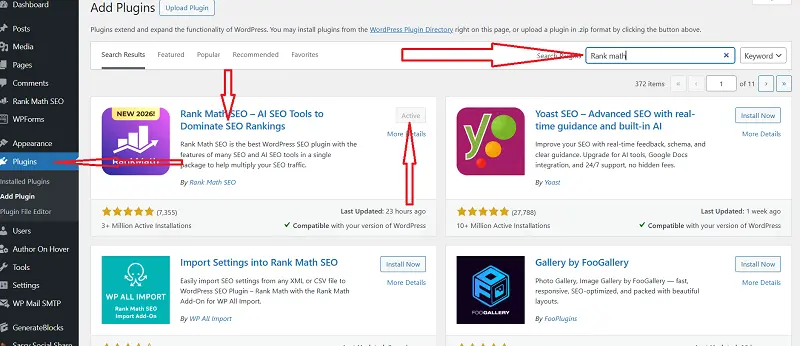
Rank Math WordPress का सबसे popular और powerful SEO plugin है। इसमें built-in Instant Indexing feature है, जो beginners के लिए perfect है।
Setup Process:
- WordPress dashboard में जाएं → Plugins > Add New पर click करें।
- Search box में “Rank Math” type करें और plugin install करके activate करें।
- Activation के बाद Setup Wizard automatically open होगा। अगर नहीं खुला तो Rank Math > Dashboard > Setup Wizard पर जाएं।
- Setup wizard में Google Search Console को connect करें। यह जरूरी है क्योंकि इसके बिना Instant Indexing काम नहीं करेगा।
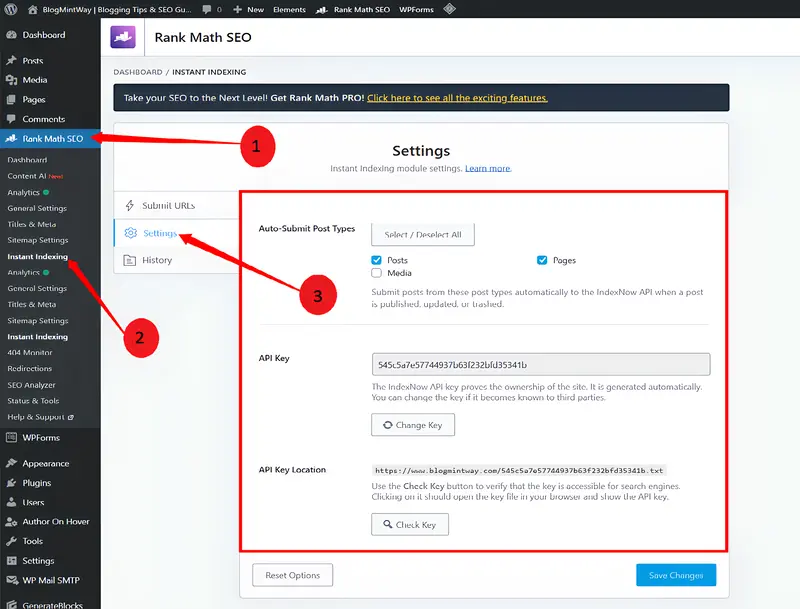
- Rank Math > Instant Indexing में जाएं।
- “Enable Instant Indexing” और “IndexNow API Key” दोनों enable करें।
- IndexNow के लिए API key automatically generate हो जाएगी। “Generate API Key” button पर click करें।
- Settings save करें।
जरूर पढ़े: On-Page SEO Tips: Google Ranking Kaise Improve Kare?
अब जब भी कोई new post publish होगी, Rank Math automatically उसे Google और other search engines को submit कर देगा। Manual submit के लिए post editor में Rank Math meta box में “Index Now” button दिखेगा, उस पर click करें।
Pro tips:-Rank Math Pro के Extra Benefits:
- Google Indexing API का access मिलता है
- 500 URLs per day तक instant indexing
- और भी fast और reliable
Method 2: Index Now Plugin (Best Free Option)
अगर आप free solution चाहते हैं, तो IndexNow plugin best है। यह Microsoft Bing और Yandex द्वारा support किया जाता है।
जैसे Rank Math Plugin install करके Active किया है वैसे ही इसको भी करे:
जरूर पढ़े: Google Traffic Increase Tips – Best SEO Guide 2026
Setup Steps:
- Plugins > Add New → “IndexNow” search करें।
- Plugin install और activate करें।
- Settings > IndexNow में जाएं।
- API key automatically generate होगी। अगर नहीं हुई तो “Generate New Key” click करें।
- “Automatically submit URLs” enable करें।
- Settings save करें।
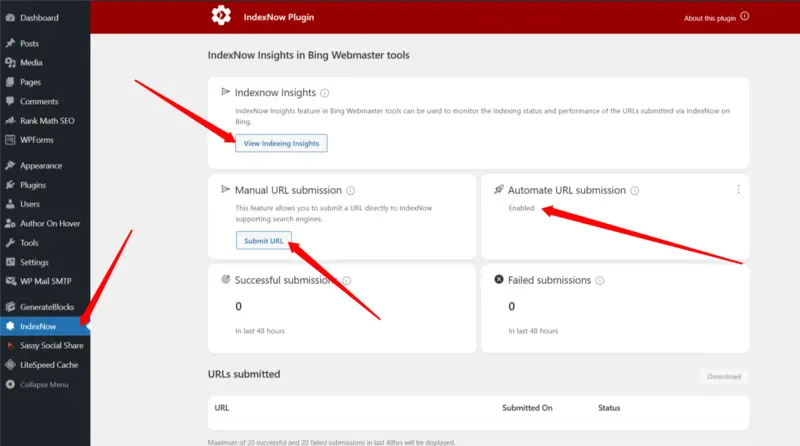
अब जब भी कोई post publish या update होगी, Index Now automatically उसे Bing, Yandex और other supporting search engines को notify कर देगा।
Important Note: अभी IndexNow direct Google support नहीं करता, लेकिन Bing indexing से indirect benefit मिलता है। Future में Google भी support कर सकता है
Method 3: Yoast SEO Plugin
अगर आप Yoast SEO use कर रहे हैं, तो plugin change करने की जरूरत नहीं। Yoast SEO Premium में Index Now integration है।
Setup Process:
- Yoast SEO Premium install होना चाहिए (Free version में नहीं)।
- SEO > General > Integrations में जाएं।
- IndexNow enable करें।
- API key automatically generate होगी।
- Automatic submission enable करें और save करें।
Yoast SEO भी Rank Math की तरह काम करता है, बस interface थोड़ा अलग है।
Method 4: Google Search Console Manual Method (100% Free)
Basic और free method। अगर आपकी website पर ज्यादा posts नहीं हैं या plugins use नहीं करना चाहते, तो यह perfect है।
जरूर पढ़े: Directory Submission in hindi:Powerful SEO Backlinks
Steps:
- Google Search Console (search.google.com/search-console) में login करें।
- अपनी website property select करें।
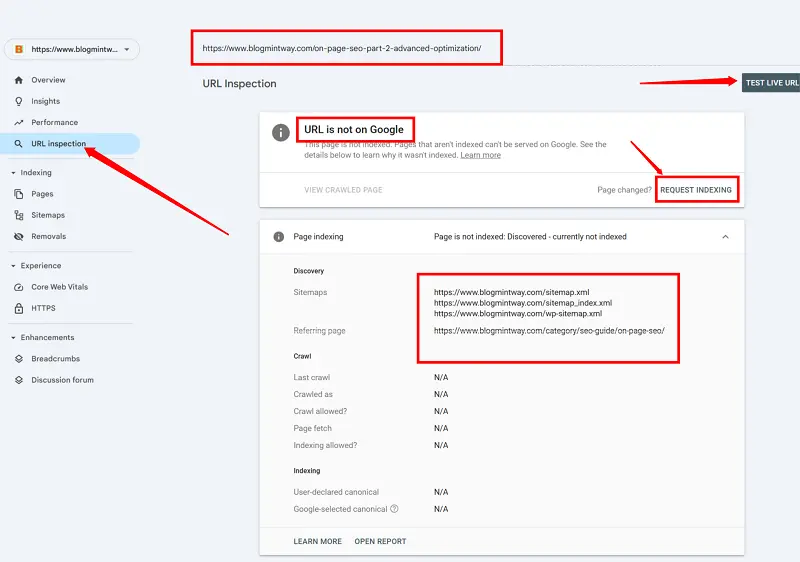
- Left sidebar में “URL Inspection” tool पर click करें।
- WordPress post का complete URL copy करके search bar में paste करें।
- Google check करेगा कि URL indexed है या नहीं।
- अगर “URL is not on Google” दिखे → “Request Indexing” button click करें।
- Google 1–2 minutes में URL को indexing queue में add कर देगा।
Limitations:
- Daily limit: केवल 10–12 URLs manually request कर सकते हैं।
- Multiple posts publish करने वाले bloggers के लिए practical नहीं।
Method 5: Google Indexing API (Advanced Users)
Technical और advanced method, लेकिन सबसे fast और reliable है।
Setup Steps:
सबसे पहले रैंक मैथ का एक इंस्टेंट इंडेक्सिंग फॉर गगूल का प्लगइन इनस्टॉल एंड एक्टिव करे।फिर cloud console setup kare
Step 1: Google Cloud Console Setup
- console.cloud.google.com में login करें
- नया project बनाएं →”Create Project” → नाम दें (जैसे “My Website Indexing”) or click kare अब Project सलेक्ट करे ।अब प्रोजेक्ट डेस्कबोर्ड खुलेगा
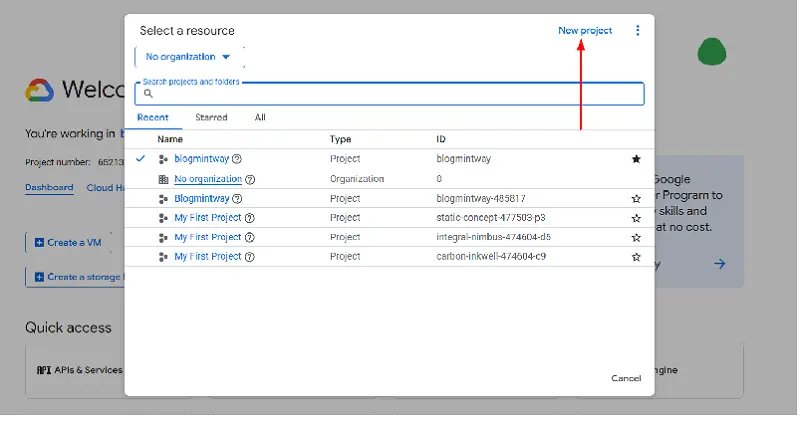
Step 2: Indexing API Enable करें
लेफ्ट साइड में three डॉट पर क्लिक करे और I am Admin सलेक्ट करे
- APIs & Services > Library में जाएं
- “Indexing API” search करें और Enable करें
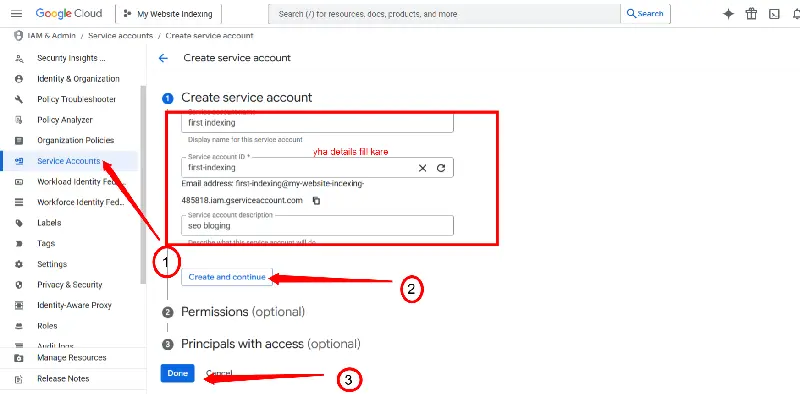
Step 3: Service Account बनाएं
लेफ्ट साइड में सर्विस अकाउंट पर क्लिक करे
- APIs & Services > Credentials → “Create Credentials” → Service Account select करें
- Name दें, Role: Owner select करें → Done
अब जो mail बनी है उसे कही पर कॉपी करके रख ले फिर Mail के सामने three डॉट पर क्लिक करे और मैनेज key को सलेक्ट करे
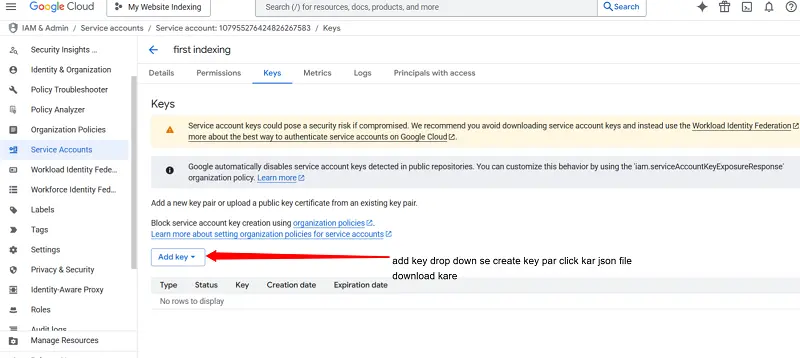
Step 4: JSON Key Download करें
- Service account → Keys tab → “Add Key” → Create New Key → JSON select करें
- JSON file download करें और safely store करें
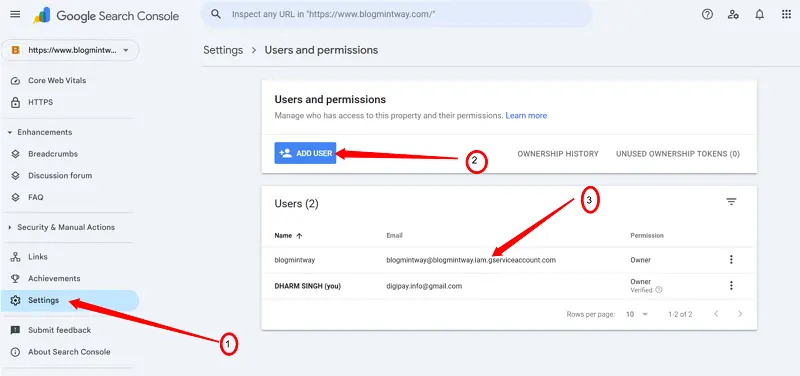
Step 5: Search Console Permission दें
- जो Mail हमने कॉपी करके सेव की थी उसे यहाँ Add user पर Add करे Owner सलेक्ट करे “
- Search Console → Settings > Users and Permissions → Add User → Permission: Owner
Step 6: WordPress में Setup
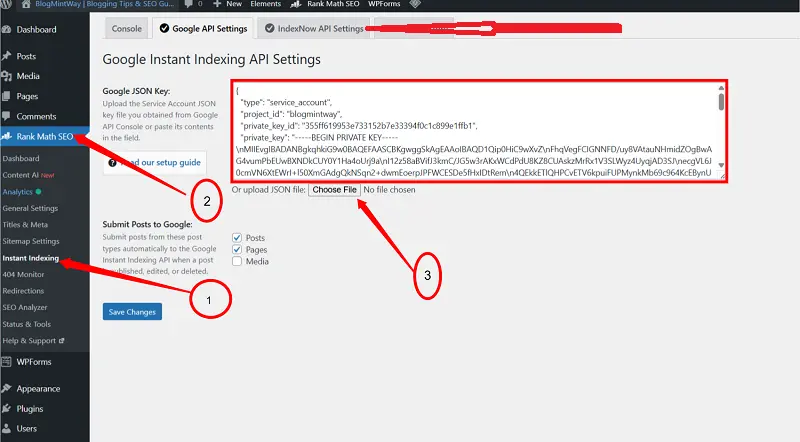
Rank Math का Instant Indexing for Google प्लगइन इनस्टॉल And Active किया हमने पहले अब वापिस वही जाना है
- Rank Math : Instant Indexing → “Use Google Indexing API” enable → JSON contents Upload → Save
अब हमारा सेटअप कम्पलीट हो चुका है अब हमें check करना है की सही से work कर रहा है या नहीं All post पर जाओ और post के निचे Instant Indexing पर क्लिक करने पर Success दिखाना चाहिए
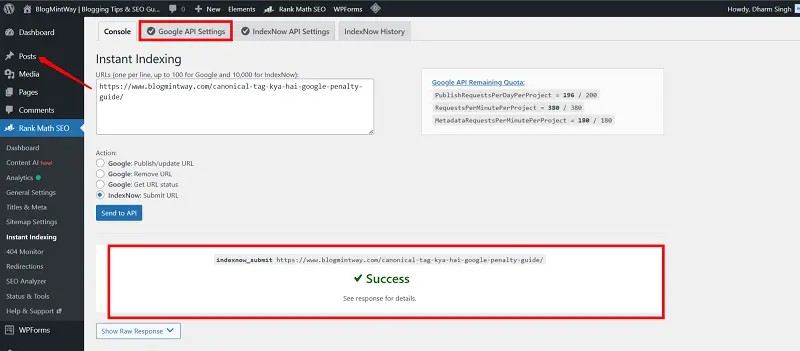
Daily Limit: 200 URLs per day
Best WordPress Plugins for Instant Indexing – Complete Comparison
- Rank Math – Easy, beginner-friendly, Pro version fast indexing
- Yoast SEO Premium – Already use कर रहे हैं तो switch नहीं करना पड़ेगा
- Index Now Plugin – Free, supports Bing & Yandex
आइए अब detail में देखें कि कौन सा plugin आपके लिए best है:
जरूर पढ़े: Mobile Optimization in SEO:अपनी Slow Website को Fast करने के आसान Tips 2026
Top WordPress Plugins for Instant Indexing
WordPress में Instant Indexing के लिए अलग-अलग plugins available हैं। यहाँ सबसे popular और effective options की तुलना दी जा रही है:
1. Rank Math PRO (Highly Recommended)
Price: $59/year (5 websites तक)
Features:
- Automatic IndexNow integration
- Google Indexing API built-in
- 500 URLs/day instant indexing
- One-click manual indexing
- Detailed indexing logs
- Complete SEO suite included
- Local SEO features
- Schema markup
- Analytics integration
Pros:
- सबसे user-friendly interface
- Complete SEO solution
- Regular updates और support
- No coding required
- Bulk indexing option
Cons:
- Paid (लेकिन worth it)
- कुछ features beginners के लिए overwhelming हो सकते हैं
Best For: Serious bloggers और businesses जो complete SEO solution चाहते हैं।
2. Index Now Plugin (Best Free Option)
Price: Completely Free
Features:
- Automatic Index Now submission
- Bing, Yandex support
- Simple और lightweight
- No setup hassle
- Unlimited submissions
Pros:
- 100% free
- बहुत easy setup
- Lightweight (site speed affect नहीं होती)
- Official WordPress.org plugin
Cons:
- Google direct support नहीं
- Limited features
- No detailed logs
Best For: Beginners और budget-conscious bloggers।
3. Instant Indexing by Brainstorm Force
Price: Free + Pro version ($99/year)
Features:
- Google Indexing API support
- 200 URLs/day (free)
- Bulk indexing (pro)
- Content analytics (pro)
- Auto-submission
Pros:
- Free version काफी powerful
- Google API का direct integration
- Clean interface
Cons:
- Pro version थोड़ा expensive
- Support limited in free version
Best For: जो specifically Google Indexing API चाहते हैं without Rank Math।
4. Yoast SEO Premium
Price: $99/year (1 website)
Features:
- IndexNow integration
- Complete SEO suite
- Content analysis
- Schema markup
- Premium support
Pros:
- Trusted brand
- Complete SEO features
- Good documentation
Cons:
- Expensive
- Indexing features limited compared to Rank Math
- No Google Indexing API
Best For: Existing Yoast users जो plugin change नहीं करना चाहते।
Comparison Table
| Feature | Rank Math Pro | IndexNow Plugin | Instant Indexing | Yoast Premium |
| Price | $59/year | Free | Free/$99 | $99/year |
| Google API | ✅ Yes | ❌ No | ✅ Yes | ❌ No |
| IndexNow | ✅ Yes | ✅ Yes | ❌ No | ✅ Yes |
| Auto Submit | ✅ Yes | ✅ Yes | ✅ Yes | ✅ Yes |
| Bulk Index | ✅ Yes | ❌ No | ✅ Pro only | ❌ No |
| Daily Limit | 500 URLs | Unlimited | 200 URLs | Unlimited |
| Support | Excellent | Limited | Good | Excellent |
| SEO Features | Complete | None | Basic | Complete |
| Ease of Use | ⭐⭐⭐⭐⭐ | ⭐⭐⭐⭐⭐ | ⭐⭐⭐⭐ | ⭐⭐⭐⭐ |
Recommendation:
- अगर budget है → Rank Math Pro without thinking
- अगर free solution चाहिए → Index Now + Manual GSC method
WordPress में Instant Indexing Setup – Complete Step-by-Step
मैं Rank Math के साथ setup explain कर रहा हूँ क्योंकि यह सबसे complete solution है।
Pre-Requirements (जरूरी चीजें)
- ✅ WordPress Website (self-hosted)
- ✅ Google Search Console Account (website verify हो)
- ✅ SSL Certificate (HTTPS)
- ✅ XML Sitemap (yoursite.com/sitemap.xml accessible)
- ✅ Proper Hosting (slow hosting indexing delay कर सकती है)
Phase 1: Installation और Basic Setup
- WordPress dashboard → Plugins > Add New
- Search: Rank Math SEO → Install Now → Activate
- Welcome screen → “Start Wizard” → Free Rank Math account बनाएं या login करें
- Mode: Easy (beginners के लिए best)
Phase 2: Google Search Console Connection
- Setup wizard → “Connect Google Search Console” → Connect Now
- Popup → Google account select करें → Allow permissions
- Website select करें → Connection successful message आएगा
Phase 3: Instant Indexing Enable करना
- Rank Math → General Settings → Instant Indexing tab
- IndexNow Settings:
- “Enable Instant Indexing” ON करें
- “Generate API Key” → automatically unique key generate होगी
- “Automatically ping search engines when publishing a post” enable करें
- Google Indexing API (Pro Users):
- “Enable Google Indexing API” ON करें
- JSON credentials paste करें (Method 5 में बनाई गई)
- “Test Connection” → verify
Save Changes
जरूर पढ़े: SEO Friendly Blog Post Kaise Likhe – Beginner Step by Step Guide
Phase 4: Post Types Configuration
- Select करें कि कौन-कौन से post types auto-index होंगे (Posts, Pages, Custom Post Types)
- Save करें
Rank Math के General Settings → Instant Indexing tab में “Post Types” section होगा।
यहां select करें कि कौन-कौन से post types automatically index होंगे:
- Posts: ✅ Definitely enable करें
- Pages: ✅ Important pages के लिए
- Custom Post Types: अपनी जरूरत के हिसाब से
Phase 5: Testing
अब check करें कि सब सही से काम कर रहा है या नहीं।
- Test Post बनाएँ:
- WordPress में एक new post create करें (कुछ भी content testing के लिए)
- Post को publish करें
- Rank Math Meta Box:
- Right sidebar में Rank Math meta box दिखेगा
- Instant Indexing section में green tick mark होना चाहिए:
- “Submitted to IndexNow”
- अगर Pro version है → “Submitted to Google” भी दिखेगा
- Verify करें:
- Rank Math → Instant Indexing → Console में जाएं
- Recent submissions की list check करें
- Status “Success” होना चाहिए
- Google Search Console Check:
- GSC में login करें → URL Inspection tool → test post का URL डालें
- “URL is on Google” दिखे → Perfect
- “Discovered – currently not indexed” दिखे → कुछ घंटों में index हो जाएगी
IndexNow API क्या है और कैसे काम करता है?
- Launch: 2021 में Microsoft Bing और Yandex ने मिलकर
- Purpose: Website owners directly search engines notify करें नए content के बारे में
- Traditional Crawling में problem:
- Time-consuming (days/weeks)
- Resources waste
- Inefficient
IndexNow इसे real-time और efficient बनाता है।
IndexNow कैसे काम करता है?
Process:
- WordPress पर post publish/update → Plugin (Rank Math/IndexNow) automatically notification भेजता है
- Notification IndexNow API को भेजा जाता है, जिसमें updated URLs की list होती है
- IndexNow → notification instantly सभी participating search engines को forward करता है
- Search engines real-time में पता लगाते हैं और priority से crawl/index करते हैं
Index Now के फायदे
- Unlimited Submissions: कोई daily limit नहीं
- Multiple Search Engines: Bing, Yandex, Seznam, Naver
- Free Forever: Zero cost
- Fast Processing: Real-time notifications → Fast indexing
- Environmentally Friendly: Unnecessary crawling कम
- Easy Implementation: WordPress plugins make it simple
Limitations:
- Google Support: अभी officially नहीं
- Indexing Guarantee नहीं: Quality matter करती है
- Technical Issues: कभी-कभी API temporarily down हो सकती है
Future:
- Experts मानते हैं कि Index Now भविष्य का standard बन सकता है
Google Indexing API vs Index Now – कौन बेहतर है?
| Feature | Google Indexing API | IndexNow |
| Connection | Direct Google | Multiple Search Engines |
| Daily Limit | 200 URLs/day free | Unlimited |
| Setup Complexity | High (JSON, Service Account) | Very Easy (API Key) |
| Cost | Paid options for more quota | Free |
| Indexing Guarantee | High (priority indexing) | No guarantee |
| Best For | Breaking news, e-commerce | General blogs, international audience, budget-conscious bloggers |
Recommendation (Personal):
- Best Strategy: दोनों use करें
- Google Traffic (Priority): Rank Math Pro + Google Indexing API
- Important posts के लिए manual GSC method
- Daily 200 URLs limit for Google
Other Search Engines के लिए Setup
- IndexNow को definitely enable रखें
- Bing और Yandex से भी decent traffic आता है
- यह completely free है, कोई नुकसान नहीं
Practical Setup:
- Rank Math Pro install करें (या Instant Indexing plugin)
- दोनों APIs enable करें
- Automatic submission ON रखें
- High-priority posts के लिए manual methods भी use करें
Budget-Friendly Approach:
- IndexNow plugin use करें (free)
- Important posts के लिए manual GSC method (free)
- Social signals और internal linking से Google को indirectly notify करें
Real-World Comparison
मैंने personally test किया है दोनों methods:
- Test Setup: एक ही post दो अलग websites पर publish की।
- Website 1: सिर्फ Google Indexing API
- Website 2: सिर्फ IndexNow
Results:
- Google API: Post 2 घंटे में Google में index
- IndexNow: Post 6 घंटे में Bing में, Google में 24 घंटे
Conclusion:
- Google traffic के लिए → Google API बेहतर
- Overall search engine presence के लिए → IndexNow best
WordPress में Automatic Instant Indexing Enable करना
Automatic indexing मतलब: कोई manual effort नहीं, post publish होते ही automatically submit हो जाए।
Rank Math में Automatic Indexing
- Dashboard → Rank Math → General Settings → Instant Indexing
- Enable Instant Indexing: ON करें
- Automatically ping search engines when:
- Publishing a post ✅
- Updating a post ✅ (recommended)
- Deleting a post → optional
Post Type Selection:
- Posts ✅
- Pages ✅
- Products (WooCommerce) ✅
- Custom Post Types → relevant
Advanced Settings (Pro):Instant indexing for google
- Index on schedule → scheduled posts automatically index
- Bulk indexing → पुरानी posts bulk submit करें
- Priority URLs → कुछ specific URLs priority submit
Save Changes पर click करें
Testing Automatic Indexing
- Sample post बनाएं → Publish करें
- Rank Math meta box → Instant Indexing section में green tick
- Message: “Submitted to IndexNow” और “Submitted to Google” (Pro)
Rank Math Console:
- Real-time log → Status “Success”
- Timestamp check करें → Recent entry
Google Search Console:
- 2-3 घंटे बाद → URL Inspection → “URL is on Google” या “Discovered – currently not indexed”
Scheduled & Bulk Indexing
- Scheduled Posts: जैसे ही publish होगी → automatic index
- Bulk Indexing Old Posts:
- Rank Math Pro: Console → Bulk Indexing → Post type select → Start
- Manual (Free): Daily 10-15 important posts GSC में submit → 2-3 weeks में cover
जरूर पढ़े: What is Image Optimization। Image Optimization क्या होता है? (Beginners Guide in Hindi)
Common Problems & Solutions
Problem 1: Plugin काम नहीं कर रहा
- Green tick नहीं दिख रहा, Console में “Failed”
Solutions:
- API Key check करें → Generate API Key if blank
- GSC connection re-authenticate
- Plugin update
- Conflicts check → temporarily disable other plugins
- Server logs check → allow outbound API calls
Problem 2: “Quota Exceeded” या “Rate Limit” Error
- Google API daily limit 200 URLs
Solutions: - Wait 24 hours or switch temporarily to IndexNow
- Strategically submit → important posts only
- Paid quota request → optional
Problem 3: Submit हो रहा है लेकिन Index नहीं
- Google decide करता है based on content quality
Solutions: - Content quality improve करें → 800-1000 words, unique, well-formatted
- Technical SEO check → robots.txt, meta robots, “Discourage search engines” unchecked
- Internal linking & external signals (social, forums, newsletter)
- Sitemap re-submit
Problem 4: Website Slow
- Caching plugin use करें → WP Rocket, W3 Total Cache, WP Super Cache
- Background Processing enable करें
- Lighter plugin try करें (IndexNow plugin)
- CDN use करें → Cloudflare
- Hosting upgrade consider करें
Problem 5: JSON Credentials Error (Google API)
- Verify JSON file → proper format
- Service account → Owner permission
- Re-generate credentials if needed
- Wait 10-15 min for propagation
Best Practices for WordPress Instant Indexing
- Quality Content
- Minimum 800-1000 words, unique, images/videos, grammar correct
- Technical Setup Solid
- HTTPS, mobile responsive, fast loading, structured data, XML sitemap, clean URLs
- Strategic Indexing
- Immediate Indexing → breaking news, trending topics, high-competition keywords
- Normal Indexing → evergreen content, archive, category pages
- Regular Monitoring
- Weekly → Rank Math Console, GSC coverage report, errors
- Monthly → indexing audit, API quota check
- Multi-Channel Approach
- Social signals, email marketing, internal linking, guest posting, community engagement
Avoid Over-Optimization
- Don’t Spam Requests: एक post को 2-3 बार से ज्यादा submit न करें। बार-बार same URL submit करना spam माना जाएगा। Google penalize कर सकता है।
- Don’t Submit Low-Quality Pages: Contact, Privacy Policy जैसी pages को instant indexing की जरूरत नहीं।
- Don’t Ignore Guidelines: Google और IndexNow के guidelines follow करें। Violations से API access revoke हो सकता है।
- Don’t Forget Updates: Old posts update करते समय re-submit करें। Content freshness important है।
WordPress Speed और Instant Indexing का Connection
Speed क्यों Important है?
- Google’s Perspective:
Crawlers के पास limited resources हैं। Slow website → pages load होने में ज्यादा time → कम pages crawl होंगे। Fast website = more pages crawled = faster indexing. - Crawl Budget:
Google हर website को “crawl budget” देता है। Slow website → budget waste। Fast website → efficient use। - User Experience Signals:
Slow site → high bounce rate → negative signal → indexing priority कम। - Mobile-First Indexing:
Mobile users generally slower connections पर हैं। Slow site → mobile-first indexing में problem।
WordPress को Fast कैसे बनाएं?
- Hosting Optimization:
- Managed WordPress hosting recommended
- Server location target audience के पास
- PHP 8.0+
- LiteSpeed/Nginx preferred
- Caching Implementation:
- Browser caching enable करें
- Plugins: WP Rocket, W3 Total Cache
- Object caching: Redis/Memcached
- CDN: Cloudflare free option
- Image Optimization:
- WebP format
- Lazy loading enable
- Correct dimensions
- Plugins: Smush, ShortPixel
- Database Cleanup:
- WP-Optimize plugin
- Post revisions limit: define(‘WP_POST_REVISIONS’, 3)
- Spam comments, trash items delete
- Plugin Management:
- Unnecessary plugins deactivate/delete
- Lightweight alternatives use
- Conflicts check regularly
- Theme Optimization:
- Lightweight themes: GeneratePress, Astra, Kadence
- Child theme for customizations
- Code Optimization:
- CSS/JS minify
- Unused CSS remove
- HTTP requests कम
- Defer non-critical JS
- Critical CSS inline
Speed और Instant Indexing का Perfect Combination
- Fast website → Google crawlers quickly scan करें
- Instant Indexing → Google immediately notify हो जाए
- Combined = maximum efficiency
Real Example:
- Load time 8s → new posts index 3-4 days
- Hosting upgrade + caching + image optimization → load time 2s
- Instant indexing setup → new posts 4-6 hours में index
Pro Tip: PageSpeed Insights metrics target:
- Mobile score: 70+
- Desktop score: 90+
- LCP: < 2.5s
- FID: < 100ms
- CLS: < 0.1
Troubleshooting Guide – Step by Step
Phase 1: Basic Checks (5 min)
- Plugin active और updated है?
- Internet connectivity check करें
- API Keys present हैं?
- GSC connected?
Phase 2: Intermediate Diagnostics (15 min)
- Browser console errors (F12 → Console)
- Server logs check
- Plugin conflicts → temporarily deactivate others
- Theme conflicts → switch default theme, test post
Phase 3: Advanced Troubleshooting (30 min)
- Firewall Rules → hosting/security plugins block?
- PHP version 7.4+, memory limit 256MB+, max_execution_time 300s
- Database optimize/repair
- File permissions → folders 755, files 644, wp-config.php 400/440
Phase 4: Expert Level (Contact Support)
- Detailed documentation prepare करें
- Rank Math Support → ticket raise करें
- WordPress Community forum → post करें
- Hire expert → Fiverr/Upwork
How It Works
With Rank Math Pro
- Google के लिए: Google Indexing API automatically use होता है।
- Bing/Yandex के लिए: IndexNow automatically use होता है।
- No separate actions needed – सिर्फ एक publish button से सब search engines notified।
Manual Approach
अगर plugin use नहीं कर रहे:
- Google: Search Console में manually submit करें।
- Bing: Bing Webmaster Tools में submit करें।
- Yandex: Yandex Webmaster में submit करें।
⚠️ यह method बहुत time-consuming है। Plugins recommended हैं।
IndexNow Advantage
- एक API call = multiple search engines notify
- Bing, Yandex, Seznam, Naver automatically receive
- Future में और search engines join कर सकते हैं
Recommendation: Rank Math Pro use करें – सब automatic handle हो जाएगा।
Quick Recap
- Instant Indexing क्या है:
Search engines को तुरंत notify करना, crawlers का wait नहीं करना। - Why It Matters:
Fast indexing → fast visibility → fast traffic। Competitive niches और trending topics में खास। - Best Methods:
- Rank Math Pro – Complete solution, Google API + IndexNow
- IndexNow Plugin – Best free, unlimited submissions
- Manual GSC – Backup method
- Key Learnings:
- Instant indexing ranking guarantee नहीं करता – content quality king है
- Technical setup जरूरी: SSL, speed, mobile optimization
- Strategic approach: हर post instantly submit जरूरी नहीं
- Regular monitoring: set-and-forget नहीं
- Multiple channels: social, email, internal linking
Your Action Plan
Today (Next 30 Minutes)
- Decide Approach:
- Budget? → Rank Math Pro
- No budget? → IndexNow plugin
- Plugin Install:
WordPress dashboard → Plugins → Add New → Search “Rank Math” / “IndexNow” → Install & Activate - Basic Setup:
- Setup wizard follow करें
- Google Search Console connect करें
- API keys generate करें
This Week (Next 7 Days)
| Day | Task |
| 1-2 | Settings configure करें, auto-submission enable करें, post types select करें |
| 3-4 | Test post publish करें, GSC में indexing verify करें, logs check करें |
| 5-7 | Top 5–10 existing posts re-submit करें, high-traffic/recently updated priority दें, results monitor करें |
This Month (Next 30 Days)
| Week | Task |
| 1 | Daily routine develop: हर new post instant index, monitor success, fix issues |
| 2 | Site speed improve करें: images optimize, caching plugin setup, page load <3s target |
| 3 | Content quality improve करें: old posts update, better formatting, re-submit |
| 4 | Analytics review करें: instant indexing impact, traffic patterns study, strategy adjust |
Long-Term Strategy
- Monthly: GSC coverage, indexing success rate, fix errors, identify top posts
- Quarterly: SEO audit, site speed retest, plugin updates, explore new features
- Yearly: ROI analyze (paid plugins worth?), industry updates, explore new indexing methods
Final Thoughts & Motivation
- Instant Indexing sirf tool है, magic wand नहीं
- Consistency + quality content + technical SEO + user experience = real success
- Patience: New websites को 1–2 weeks में index होना normal, significant improvements 3–6 months में
- Keep learning: SEO & indexing constantly evolve
- Focus on value: Readers की problems solve करें → Search engines reward करते हैं
Action Now: WordPress dashboard open करें → Plugin install करें → Setup wizard complete करें → First test post publish करें
| Resource Name | Purpose / Benefit | Who Should Use |
|---|---|---|
| Google Search Console Complete Guide | Google में अपनी website को track, monitor और URLs submit करना सीखें | Beginners और WordPress bloggers |
| WordPress SEO Optimization Tips | Website को SEO-friendly बनाने के practical tips | सभी WordPress users |
| Rank Math vs Yoast: Complete Comparison | दोनों SEO plugins का detailed comparison, features और pros/cons समझें | Bloggers/website owners deciding SEO plugin |
| How to Speed Up WordPress Website | Website loading speed improve करने के step-by-step tips | Bloggers और e-commerce sites |
| Content Writing Tips for Better Rankings | SEO-friendly और reader-friendly content लिखना सीखें | Content creators और bloggers |
FAQs
Q1.Instant Indexing free है? Free: IndexNow plugin, Manual GSC, Rank Math Free (basic)
Paid: Rank Math Pro, Yoast Premium, Instant Indexing Plugin Pro
Q2.Best plugin?
Rank Math Pro (best overall)
IndexNow Plugin (best free)
Yoast SEO Premium (existing Yoast users)
Q3.Ranking improve होगी?
❌ Automatically नहीं
✅ Discovery fast, faster indexing
Q4.Daily कितनी posts index करवा सकते हैं?
Google API: 200/day free
IndexNow: Unlimited
Manual GSC: 10-12/day
Rank Math Pro: 500/day Google + Unlimited IndexNow
Q5.Existing posts index करवा सकते हैं?
हां, individual, bulk, या manual methods से
Q6.Mobile pages index होंगे?
हां, Google mobile-first indexing follow करता है
Author Profile

- I am Dharm Singh, and I share tips on blogging, SEO, and earning money online in Hindi.My goal is to help new bloggers and digital marketers learn easily and improve the ranking of their blog or website.
Latest entries
 AI & ChatGPTSeptember 9, 2026AI content kaise banaye? Chatgpt से हाई-क्वालिटी कंटेंट बनाने की पूरी गाइड
- Web HostingMay 30, 2026Hostinger vs GoDaddy Comparison 2026: India Ke Liye Best Hosting
- Make MoneyMay 20, 2026Online Paise Kaise Kamaye Phone Se: 2026 का सबसे प्रैक्टिकल और Deep गाइड
- BloggingMay 9, 2026How to Find Long Tail Keywords (Free Low Competition SEO Guide 2026)



hello
Hi! I could have sworn I’ve been to this site before but after reading through some of the post I
realized it’s new to me. Anyhow, I’m definitely
happy I found it and I’ll be bookmarking and checking
back frequently!
Thank you so much! 😊 I’m really glad you discovered BlogMintWay and found the posts helpful. Your support means a lot—hope to see you back again soon!
It’s very trouble-free to find out any topic on web as compared
to textbooks, as I found this piece of writing at this site.
Thank you! 😊 I’m glad you found the article helpful. I really appreciate your feedback and hope you enjoy more useful content on BlogMintWay!
I would like to thank you for the efforts you’ve put in penning
this website. I really hope to see the same high-grade
blog posts by you later on as well. In truth, your creative writing abilities has encouraged me to get my own, personal website now
😉
Thank you so much for your kind and encouraging words! It truly means a lot to know that you found the content valuable and inspiring. Your appreciation motivates me to keep creating high-quality and helpful blog posts.
I’m especially glad to hear that my writing has inspired you to start your own website—that’s honestly one of the best compliments I could receive. Wishing you great success on your journey! If you ever need any guidance or help along the way, feel free to reach out.
Stay connected, and thank you once again for your support!
Very good info. Lucky me I came across your blog by
chance (stumbleupon). I have book marked it for later!
Thank you so much! 😊 I’m glad you found the information useful. Thanks for bookmarking BlogMintWay—hope to see you again soon!