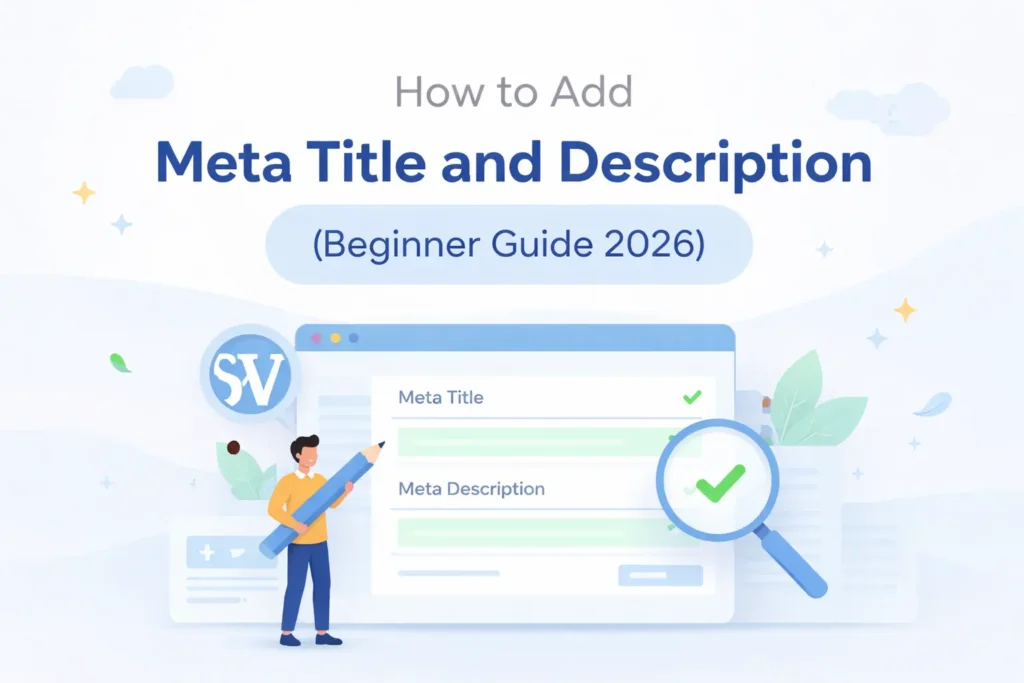
अगर आपकी website Google में दिखाई दे रही है लेकिन clicks नहीं आ रहे, तो ज़्यादातर मामलों में इसकी वजह meta title और meta description का सही तरीके से optimized न होना होता है।
कई bloggers WordPress में meta title और meta description add तो कर देते हैं, लेकिन How to Add Meta Title and Description in WordPressउन्हें SEO-friendly तरीके से नहीं लिखते, जिससे CTR (Click Through Rate) और ranking दोनों कम रहती है।
Google के अनुसार, snippet (search result description) automatically generate होता है — लेकिन अगर आपका meta description strong और relevant है, तो Google उसे show कर सकता है, जिससे आपकी CTR (Click Through Rate) और ranking दोनों improve होती हैं।
इस गाइड में आप step-by-step सीखेंगे कि WordPress में meta title और meta description कैसे add करें, SEO meta tags WordPress में कैसे optimize करें, और कैसे अपने WordPress SEO optimization को बेहतर बनाकर CTR और Google ranking को boost करें।
Meta Title और Meta Description क्या होते हैं?
जानने के लिए : How to Write Meta Descriptions | Google Search Central
Meta Title क्या है?

Meta Title वो text होता है जो Google search results में सबसे ऊपर दिखता है।
उदाहरण:
Best SEO Tips for Beginners (2026 Guide)
यह आपके page का headline होता है।
Meta Description क्या है?

Meta Description एक short summary होती है (150–160 characters), जो title के नीचे दिखाई देती है।
उदाहरण:
“Learn SEO basics with practical tips to boost your website ranking and traffic in 2026.”
Meta Tags क्या होते हैं? (Example के साथ)
Meta tags HTML code के अंदर होते हैं जो search engines को बताते हैं कि आपका page किस बारे में है।
Example:
<title>How to Add Meta Title and Description in WordPress</title>
<meta name=”description” content=”Learn step by step process to add meta title and description in WordPress.”>
जरूर पढ़े:-Why Is My WordPress Website Slow to Load? 15 Real Reasons & Fixes (2026)
Why Meta Title & Description Important for SEO?
अब सवाल आता है — How to Add Meta Title and Description in WordPress क्यों जरूरी है?
1.Search Visibility Strong होती है
Proper meta title और description search engines को आपकी page topic clearly समझाने में मदद करते हैं, जिससे ranking improve होने के chances बढ़ते हैं।
2.Organic Clicks ज़्यादा मिलते हैं
Interesting और informative meta description users का attention grab करता है, जिससे search results में click-through rate (CTR) बढ़ सकता है।
3.Website Professional दिखाई देती है
Well-optimized titles और descriptions आपकी website को search results में ज्यादा trustworthy और organized दिखाते हैं।
4.Target Audience सही Page तक पहुँचती है
Accurate meta information users को पहले ही बता देती है कि page में क्या content मिलेगा, जिससे relevant visitors आने के chances बढ़ जाते हैं।
How to Add Meta Title and Description in WordPress (Step-by-Step)
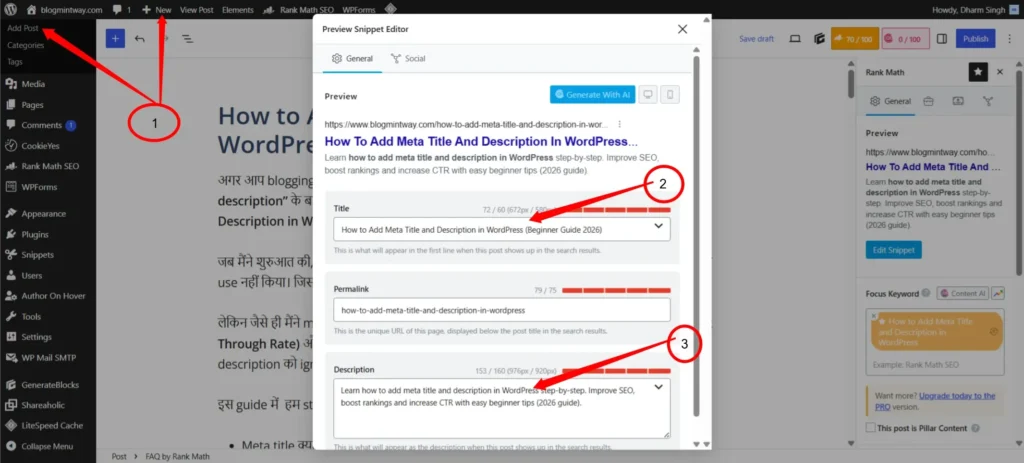
अब आते हैं main topic पर — How to Add Meta Title and Description in WordPress
जरूर पढ़े:- Instant Indexing for Google in WordPress (2026) – Best Plugins & API
Method 1: Rank Math Plugin से
Step 1: Plugin Install करें
- WordPress Dashboard → Plugins → Add New
- Search करें: Rank Math
- Install & Activate
Step 2: Post Edit करें
- Posts → Add New या Edit Post
- नीचे scroll करें
Step 3: Meta Title & Description Add करें
- Rank Math box में जाएं
- Title डालें
- Description लिखें
Example:
- Title: How to Add Meta Title and Description in WordPress
- Description: Learn step-by-step process to add SEO meta tags in WordPress.
Method 2: Yoast SEO Plugin से
Step 1: Yoast Install करें
- Plugins → Add New → Yoast SEO
Step 2: Snippet Editor खोलें
- Post edit page में नीचे जाएं
- “Edit Snippet” पर क्लिक करें
Step 3: Meta Title और Description लिखें
- SEO Title field में title डालें
- Meta description में summary लिखें
How to Write SEO Meta Title and Description
अब सिर्फ add करना ही नहीं, बल्कि सही तरीके से लिखना भी जरूरी है।
SEO Friendly Meta Title Writing Tips
- 50–60 characters रखें
- Focus keyword add करें
- Numbers और power words use करें
Example:
How to Add Meta Title and Description in WordPress (2026 Guide)
SEO Friendly Meta Description Kaise Likhe
- 150–160 characters रखें
- User intent clear करें
- CTA (Call to Action) डालें(जैसे: Learn, Discover)
Example:
Learn how to add meta title and description in WordPress and improve your SEO ranking with easy steps.
Meta Title Length and Description Length 2026
| Element | Ideal Length |
| Meta Title | 50–60 characters |
| Meta Description | 150–160 characters |
अगर limit cross होगी तो Google text cut कर देगा।
how to change meta title and description in wordpress
- WordPress में Meta Title और Description बदलकर आप अपनी वेबसाइट की SEO performance को बेहतर बना सकते हैं।
- सही Meta Title और Description search engines को आपके page का विषय समझने में मदद करते हैं।
- आकर्षक Meta Description users को search results में आपकी website पर click करने के लिए प्रेरित करता है।
- WordPress में Rank Math या Yoast SEO plugin की मदद से Meta Title और Description आसानी से edit किए जा सकते हैं।
- Optimized meta tags आपकी website की visibility बढ़ाने और organic traffic लाने में महत्वपूर्ण भूमिका निभाते हैं।
Best Meta Title and Description for Blog
- Best meta title और description आपके blog content को search results में अधिक attractive और professional बनाते हैं।
- एक optimized meta title users और search engines दोनों को page topic clearly समझाने में मदद करता है।
- Effective meta description short summary की तरह काम करती है, जो visitors को आपके article पर click करने के लिए encourage करती है।
- SEO-friendly meta tags organic traffic बढ़ाने और website visibility improve करने में महत्वपूर्ण भूमिका निभाते हैं।
- Clear और engaging meta information आपके blog की click-through rate (CTR) और user engagement को बेहतर बना सकती है।
- Focus Keyword सही जगह use करें : Title, description और content में
- Unique Content लिखें : Copy content Google reject करता है
- CTR Improve करें : Attractive title लिखें
- Regular Update करें : Old content update करते रहें
✔️ Example 1
Title: Best SEO Tips for Beginners (2026 Guide)
Description: Learn beginner-friendly SEO tips to increase traffic and ranking.
✔️ Example 2
Title: How to Add Meta Title and Description in WordPress
Description: Step-by-step guide to add SEO meta tags in WordPress easily.
Common Mistakes
- Keyword Stuffing : जरूरत से ज्यादा keywords इस्तेमाल करना
Meta title और description में बार-बार same keyword डालने से content unnatural लग सकता है और SEO पर negative effect पड़ सकता है। - Duplicate Meta Tags : हर page पर एक जैसा title रखना
अगर सभी pages में same meta title और description होंगे, तो search engines सही page identify करने में confuse हो सकते हैं। - Too Long Description : बहुत लंबी meta description लिखना
160 characters से ज्यादा description होने पर Google उसे search results में cut कर सकता है, जिससे important information छिप सकती है। - Missing Meta Tags : Meta title और description add न करना
Meta tags न होने पर search engines आपके page की जानकारी properly समझ नहीं पाते, जिससे ranking और CTR दोनों प्रभावित हो सकते हैं। - Irrelevant Meta Information : गलत या misleading details लिखना
अगर meta title और description page content से match नहीं करते, तो users जल्दी page छोड़ सकते हैं और bounce rate बढ़ सकता है।
Real Experience
मैंने खुद अपनी website पर experiment किया था:
पहले:
- No meta description
- Generic titles
बाद में:
- Optimized meta tags
- Keyword-focused titles
Result:
- CTR 2% से 6% हुआ
- Ranking improve हुई
FAQs
1. How do I change my meta title and description?
आप SEO plugin जैसे Rank Math या Yoast SEO की मदद से आसानी से meta title और description edit कर सकते हैं।
2. How do I change the meta description on my WordPress homepage?
WordPress homepage की meta description SEO plugin की Homepage Settings में जाकर बदली जा सकती है।
3. How to change meta title and description in WordPress Elementor?
Elementor में meta title और description बदलने के लिए Rank Math या Yoast SEO panel का उपयोग करें।
4. वर्डप्रेस एलिमेंट में मेटा टाइटल और डिस्क्रिप्शन कैसे बदलें?
WordPress Elementor में SEO plugin के settings section से meta title और meta description आसानी से edit किए जा सकते हैं।
Conclusion
अगर आप blogging या SEO में serious हैं, तो How to Add Meta Title and Description in WordPress सीखना आपके लिए बहुत जरूरी है।
Meta title और description छोटे लगते हैं, लेकिन ये आपकी website की success में बहुत बड़ा role play करते हैं। एक सही optimized title और description आपकी ranking, CTR और traffic को dramatically बढ़ा सकता है।
इस guide में आपने सीखा:
- Meta tags क्या होते हैं
- WordPress में कैसे add करें
- Rank Math और Yoast plugin का use
- SEO friendly writing tips
“Agar aapko SEO aur blogging ke tips chahiye, to hamare dusre guides bhi jarur padhe”
अगर आपको यह जानकारी useful लगी हो, तो इस post को अपने दोस्तों के साथ share करें और नीचे comment करके अपनी राय जरूर बताएं।
Author Profile

- I am Dharm Singh, and I share tips on blogging, SEO, and earning money online in Hindi.My goal is to help new bloggers and digital marketers learn easily and improve the ranking of their blog or website.
Latest entries
 AI & ChatGPTSeptember 9, 2026AI Content Kaise Banaye? SEO-Friendly Content Ki Complete Guide 2026
- Web HostingMay 30, 2026Hostinger vs GoDaddy 2026: India Ke Liye Best Hosting Kaun Si Hai?
- Make MoneyMay 20, 2026Online Paise Kaise Kamaye Phone Se: 2026 का सबसे प्रैक्टिकल और Deep गाइड
- BloggingMay 9, 2026How to Find Long Tail Keywords (Free Low Competition SEO Guide 2026)